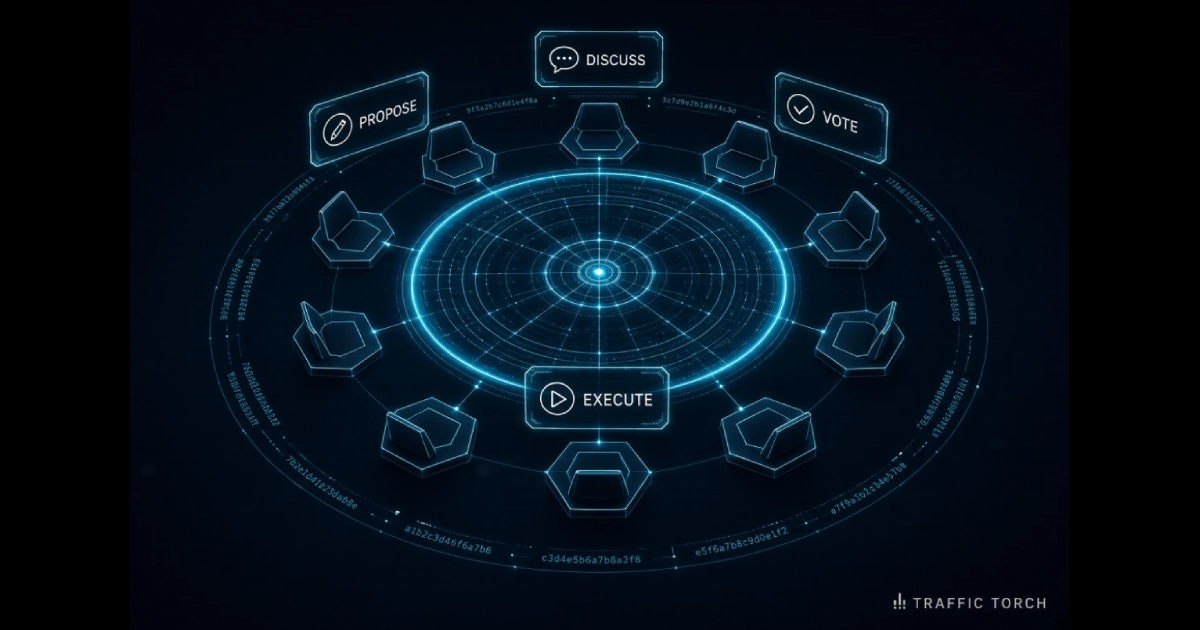
Decentralised Governance Help Guide – Round Table, Votes, Objector's Bench, Audit Chain & Simulator
How the Traffic Torch Round Table turns every decision into a public, verifiable, reversible process — and how you can watch it happen in 30 seconds.
The Traffic Torch Round Table is a live governance system running on the same site you're reading now. Every eligible user has equal voting authority. No admin table exists — by design. Every action is hash-chained and publically verifiable. Every decision is reversible. And every rule can be changed, but only by clearing the highest threshold on the site.
This guide walks through the whole system: how proposals work, how votes are decided, how the block threshold protects minorities, how the Objector's Bench can pause but never block, how the audit chain proves nothing was altered, and how the simulator lets you watch the rules play out with no account, no vote, and no commitment.
See it work
Watch a governance decision move from proposal to execution in 30 seconds — no account needed.
Free • Public • No commitment.
1. What is the Round Table?
The Round Table is the governance system that runs inside Traffic Torch. Every eligible user has one vote, and only one vote. No administrator can override a decision. No single account can edit the rules. Every proposal, comment, vote, objection, reconsideration, and execution is recorded on a public chain of hashes so that anyone can verify what actually happened.
It runs on four principles:
- Equal authority. No privileged accounts. There is no admin table in the database. Every rule applies to every user identically, including the person who wrote the code.
- Tamper-evident. Every action produces a SHA-256 hash chained to the previous one. Modify any historic entry and the chain breaks — visibly.
- Minority-protected. The 25% block threshold means a 66% majority is necessary but not sufficient. Substantial opposition can stop any proposal.
- Reversible. Every resolution can be reopened within 30 days by 10% of eligible users. Nothing is permanent.
Live URL: /community/round-table/. The constitution, founding document, and maintainer-powers document are all published alongside.
2. The founding documents
The system ships with three published documents and seven seed proposals that bootstrap the community from a blank database:
- Constitution. The rules. Amendments require a Meta proposal to clear 75% YES with under 25% NO. /community/round-table/constitution/
- Founding Document. The origin story and the initial commitments: why the system exists, what it will never do, what early adopters agreed to. /community/round-table/founding/
- Maintainer Powers. A short, explicit list of what the code maintainer can and cannot do. Merging code, applying an already-approved config, running the R2 attachment purge — and nothing else. /community/round-table/maintainer-powers/
The seven seed proposals are pre-loaded when the governance tables are first created. They cover: ratifying the constitution, electing the first bench, enabling configurable pass thresholds, setting the initial consider window at 30 days, enabling reconsideration, publishing the maintainer powers, and bootstrapping the audit chain. All seven are visible in the feed from day one, so the community isn't starting from an empty board.
3. Four kinds of proposal
Every proposal has a kind. The kind determines the pass threshold, the apply mechanism, and how the outcome affects the site:
| Kind | Threshold | What it changes | On pass |
|---|---|---|---|
| Advisory | 66% | Nothing structural. Records community signal. | Recorded only |
| Config | 66% | A config key: thresholds, quorum, block percentage. | Applied immediately |
| Meta | 75% | The rules themselves — constitution, cadence, meta thresholds. | Applied after 72-hour delay |
| Code | 66% | A code change, linked to a pull request. | Records intent — human must merge PR |
The kind is set at creation and cannot be changed afterwards. If a proposal's body drifts from its kind, voters reject it on those grounds — and usually do.
4. Four phases
Every proposal moves through the same four phases in the same order. Each phase has a minimum duration that depends on the kind:
| Phase | Duration | What can happen |
|---|---|---|
| Propose | Instant | Author submits body, kind, category. Enters Discuss immediately. |
| Discuss | Meta 30d · Config 14d · Code 14d · Advisory 7d | Comments, amendments by the author, bench discussion. |
| Vote | 5 days (all kinds) | Yes / No / Abstain. Bench objection can extend this by 72h. |
| Execute | Per kind | Config immediate · Meta 72h delayed · Code pending merge · Advisory recorded |
A proposal cannot skip a phase. The comment period must fully elapse before the author can open the vote. The vote must fully elapse before it can be closed. The execute step applies exactly what the voter was told would happen.
5. Eligibility — who can vote
The eligibility rule is one line of code and it is the exact rule the server enforces:
eligible = account_age_days >= 7
        && (verified_at IS NOT NULL OR profile_public = 1)
That means: the account must be at least seven days old AND the user must have either verified their profile (email verification or higher) OR made their profile public.
Why this rule?
- Seven days stops drive-by Sybil attacks. Creating a thousand accounts takes time, and seven days is long enough that farming them isn't worth the trouble for a single vote.
- Verification or public profile ensures the voter has actually engaged with the site — not just signed up and voted on a single proposal.
- No token gating, no purchase required. Governance does not require payment. Anyone can be eligible by simply being a genuine user for a week.
The simulator reads this same rule. There is no divergence between what the server does, what the simulator shows, and what the constitution says.
6. The vote — quorum, thresholds, and the block
Three separate rules decide whether a vote passes. All three must be satisfied:
Quorum — enough votes to count
Quorum is the larger of 10 votes or 20% of eligible users. If the vote closes with fewer votes cast, the outcome is no_quorum regardless of the tally.
Why the floor of 10? Small communities can't rely on 20%. At 40 eligible, 20% is 8 — too few to represent real community signal. The floor guarantees a minimum of 10 votes even in a tiny community.
Pass threshold — enough YES
Config, Code, and Advisory proposals need 66% YES. Meta proposals need 75% YES. The threshold is computed against all votes cast, including abstain. An abstain therefore dilutes YES and NO equally — it cannot be used as a stealth block.
The 25% block — enough NO to stop it
If NO is 25% or more of votes cast, the proposal fails — regardless of YES. This rule is why 66% is necessary but not sufficient: a bare majority cannot override a substantial opposition.
A worked example
| Case | YES | NO | Abstain | Outcome |
|---|---|---|---|---|
| Clean pass | 66 | 24 | 10 | Passed |
| Block wins | 74 | 26 | 0 | Blocked |
| Below threshold | 60 | 20 | 20 | Rejected |
| Under quorum | 6 | 2 | 0 | No quorum |
Row 2 is the interesting case: 74% YES still fails because NO reached 26%. The block threshold protects minority positions from being steamrolled by any majority, however large.
7. The Objector's Bench
The Objector's Bench is a small group of eligible users who can pause any open vote by filing a public objection. It exists to give the community time to discuss a live proposal — not to override the vote.
The bench's powers are deliberately narrow:
- Pause — 72 hours, once per bench member per proposal.
- Extend the vote deadline — the pause adds 72 hours to
vote_ends_atso voters keep their full 5 days. - Publish the reason — every objection carries a Markdown reason, publicly readable, and stays in the audit chain.
What the bench cannot do:
- Cannot pass a proposal.
- Cannot block or veto a proposal.
- Cannot alter the tally, the outcome, or the rules.
- Cannot pause the same proposal twice.
Bench members are selected by sortition (random draw) from the eligible user pool, with staggered term lengths so that no single cohort dominates. Every draw, every objection, and every expiry is on the audit chain.
8. The reconsider window
Every passed resolution stays open for reconsideration for 30 days. During that window, 10% of eligible users can sign a request to re-run the vote on the same proposal. If the threshold is reached, a second vote opens with the same rules, the same comment history, and the same audit trail.
The second vote overrules the first:
- Second vote fails — the original resolution is reversed. If the proposal was Config, the config change is reverted. If it was Code, the merge SHA is marked reversed and the PR is expected to be reverted.
- Second vote passes — the original resolution stands. No further reconsider is possible on the same proposal.
The reconsider mechanism is the safety valve. It means that passing a proposal is not the end of the story — if the community changes its mind within 30 days, it can reverse course without needing a new proposal.
9. Execution by kind
Once a vote passes, execution depends entirely on the kind:
Config — immediate
The config change applies the moment the vote closes. A one-line write to rt_config. No delay. Reversible via reconsider.
Meta — 72-hour delay
A Meta proposal queues a pending_delay execution scheduled 72 hours out. During those 72 hours the reconsider window is open. If 10% sign reconsider before the delay elapses, the execution is cancelled and a second vote opens. Otherwise the change applies and the reconsider window stays open for the remaining 27 days.
Code — human merge required
A Code proposal links to a pull request. When the vote passes, the proposal's state becomes pending_merge. Nothing auto-merges. A human maintainer reviews the PR, merges it, and the merge SHA is recorded on the audit chain. Without that human step, the code never lands — which is exactly how it should be.
Advisory — recorded only
An Advisory proposal changes nothing structural. The tally is recorded as a public signal. The audit chain entry is permanent. It's a way for the community to speak clearly without forcing an action.
10. The audit chain
Every governance action is recorded in a hash chain. Here's how it works in one sentence: each new entry contains a hash of the previous entry's hash plus the current payload. If any historic entry is ever modified, every subsequent entry's expected hash no longer matches, and the chain is visibly broken.
Concretely:
entry[n].this_hash = SHA256(entry[n-1].this_hash + "|" + type + "|" + payload)Every governance table (proposals, votes, comments, objections, resolutions, executions) writes into the chain. /api/rt/audit/verify recomputes every hash from the genesis entry forward and reports intact or broken. /api/rt/audit/head returns the current chain head so external monitors can periodically snapshot it.
The simulator demonstrates this visually. Open any scenario on /community/round-table/simulator/, scroll to the Audit Chain ticker, click the ⚡ tamper button on any block. That block turns red — and every block after it turns yellow, because the chain no longer connects. Click Verify and the alert reads intact: false — broken at block #N.
11. The simulator
The simulator is a fully working demo of the governance engine, running in your browser, with no account required. It has three modes:
- Compact — a small embed on the homepage and the Round Table page. No autoplay. Click Play to run a scenario.
- Full — the dedicated page at /community/round-table/simulator/. Autoplay, scrubber, transcript, audit ticker, sandbox.
- Sandbox — a tab inside the full page. Sliders for electorate size, turnout, YES/NO split, and proposal kind. Move any slider and the outcome recomputes instantly, using the same rules engine the live server uses.
Six scenarios ship by default, each teaching one rule:
| Scenario | Teaches |
|---|---|
| Config passes cleanly | The clean path through all four phases |
| Block beats pass | 66%+ YES still fails if NO reaches 25% |
| Meta change | 75% threshold, 30-day comment, 72h delay |
| Code proposal | PR appears, human reviews, SHA recorded |
| Bench + reconsider | 72h pause, deadline extension, then reconsider reverses |
| No quorum | 40 eligible, 8 votes — floor of 10 fails |
The simulator reads live rules from /api/rt/config on load. When that call succeeds, the badge reads Live rules in green. When it fails, the fallback values ship and the badge reads Default rules in amber. Either way the rules shown match what the live worker enforces.
12. Equal authority — no admins
There is no admin table in the database. There is no is_admin flag on any user row. There is no endpoint that any user can call to override, delete, or rewrite a governance decision, no matter who they are.
What exists instead:
- Every action is a proposal. Changing a threshold, adding a rule, updating the constitution — all of it is a Meta proposal. None of it can happen outside the vote.
- Every action is on the chain. Deleting a row would break the audit chain and immediately be visible. The only way to reverse a decision is the reconsider window.
- The maintainer can only merge code. The maintainer-powers document specifies exactly what the person running the site can do: merge a PR after a Code proposal passes, apply a Config change the system already queued, and run the R2 attachment purge. Nothing else.
This is unusual, and it's intentional. Most "decentralised" systems quietly keep an admin backdoor. This one doesn't. If the community wants to change a rule, it needs the community to agree to the change. If it wants to remove the maintainer, it can — by voting a new one in.
13. Amending the constitution
The constitution is self-amending. It can be changed — but only by the same process it describes, and only by clearing the highest barrier on the site. A Meta proposal to change the constitution requires:
- 75% YES — higher than any other kind.
- Under 25% NO — the block threshold still applies.
- Quorum met — at least max(10, 20% of eligible).
- 72-hour apply delay — so the community has three full days to reconsider before the change lands.
- 30-day reconsider window — 10% can trigger a second vote at any point in that window.
The current constitution is published at /community/round-table/constitution/. The founding document is at /community/round-table/founding/. Every amendment is recorded on the audit chain.
14. Frequently Asked Questions
What is the Round Table?▼
Traffic Torch's community governance system. Every eligible user has one vote, no administrators exist inside the system, and every decision is hash-chained and publically verifiable. Proposals move through Propose → Discuss → Vote → Execute with fixed rules that can only be changed by another vote.
Do I need an account to view the Round Table?▼
No. All proposals, votes, comments, bench activity, and the audit chain are publicly readable. You only need an account to submit a proposal, cast a vote, or leave a comment.
How is eligibility determined?▼
An account must be at least 7 days old AND have either a verified profile (email verification or higher) OR a public profile. This is the exact rule the server enforces. It prevents brand-new accounts from voting while remaining open to anyone who has actually participated.
What are the four kinds of proposal?▼
Advisory records community signal but applies no automatic change. Config changes a config key and applies immediately on pass. Meta changes the rules, thresholds, or the constitution; it needs 75% YES and applies after a 72-hour delay. Code links to a pull request that a human must merge — nothing auto-merges.
Why is the meta threshold higher?▼
Meta proposals change the rules that govern every other proposal. A 75% threshold instead of 66% adds friction precisely where the risk of gaming is highest. Combined with the 72-hour apply delay and the 30-day reconsider window, a rule change can only stick if it survives multiple rounds of scrutiny.
What is the 25% block threshold for?▼
The block protects minority positions. If 25% or more of votes cast are NO, the proposal fails regardless of how many YES votes it received. Without this, a bare 66% majority could steamroll a substantial opposition on every decision. The block makes 66% necessary but not sufficient.
Can a bare majority pass anything?▼
No. Config, Code, and Advisory proposals need 66% YES AND under 25% NO. Meta proposals need 75% YES AND under 25% NO. Quorum must also be met. A proposal that clears the pass threshold can still fail on the block.
Can a NO minority block a proposal even at 90% YES?▼
Yes. If NO reaches 25% of votes cast, the proposal fails even at 90% YES. This is intentional: the block exists to stop bare majorities from overriding substantial opposition. The only way to reverse a passed proposal is the reconsider window, and the only way to reverse a blocked proposal is a new proposal with lower opposition.
How long do votes last?▼
Every vote runs 5 days from open to close, regardless of proposal kind. Comment periods differ: Meta 30 days, Config 14 days, Code 14 days, Advisory 7 days. An Objector's Bench pause extends the vote deadline by 72 hours without reducing voters' time.
What happens if quorum isn't met?▼
The proposal returns outcome no_quorum and fails. Quorum is the larger of 10 votes or 20% of eligible. It prevents a tiny minority from closing a proposal when the electorate has not engaged. A no_quorum failure does not consume the proposer's 14-day cooldown as harshly as a rejection.
How do I submit a proposal?▼
Log in, go to /community/round-table/, click New Proposal, choose a kind and category, write the body in Markdown, and submit. The proposal enters Discuss immediately and cannot open a vote until the comment period for its kind has elapsed.
What is the Objector's Bench?▼
A small randomly-drawn group of eligible users who can pause any open vote for 72 hours by filing a public objection. It can only slow a vote — it cannot pass, block, or alter any proposal. Each member can file one objection per proposal with a 30-day cooldown, and a pause extends the vote deadline by 72 hours so voters keep their full 5 days.
Can the Bench block or pass a proposal?▼
No. The Bench can only pause. It has no veto, no approval, and no way to alter the outcome. A bench pause is an attention device — it forces extra discussion by extending the vote by 72 hours. The actual decision is still made by the full electorate.
How do I trigger a reconsider?▼
Within 30 days of a proposal passing, 10% of eligible users can sign a reconsider request. If that threshold is reached, a new vote opens on the same proposal with the same rules. A second-pass rejection reverses the original resolution; a second-pass approval confirms it.
How do I verify a vote result?▼
Open the proposal's page and look for the audit chain entries. Every vote, comment, close, and execute event is hashed with SHA-256 and chained to the previous entry. /api/rt/audit/verify returns an intact-or-broken status for any range. The simulator's audit ticker demonstrates this live — click Tamper on any block and every downstream block turns red.
Who can change the constitution?▼
Only a Meta proposal. The constitution is self-amending: it can be changed by the same voting mechanism it defines, and only by clearing 75% YES with under 25% NO, then surviving the 72-hour apply delay and the 30-day reconsider window. No administrator, no founder privilege, no override.
See It Work
This is governance you can actually read, verify, and change. There is no admin panel behind a login. There is no private rulebook. There is no list of privileged accounts. Every rule, every vote, every reason, and every execution is on the audit chain — and the audit chain is public.
The fastest way to understand the system is to watch it in motion: pick a scenario in the simulator, click Play, and see the rules play out. Or jump straight into the Round Table and read the live feed.