Local SEO Health On-Page Checker
Analyze local search performance, Google Business Profile signals, location schema, NAP consistency, and geo-optimization
Google Analytics 4
● Loading…Sessions
—
Users
—
New Users
—
Page Views
—
Search Console
● Loading…Total Clicks
—
Impressions
—
CTR
—
Avg Position
—
Deep Dive into Local SEO Modules
SEO Tools
Topical Authority Tool
Detect main topics & subtopics
Entity Extractor Tool
Semantic entity extractor + audit
Lighthouse Plus Tool
10-module UX + AI readiness audit
Schema Generator Tool
Detect & Generate Schema Markups
SEO Intent Tool
Intent + E-E-A-T audit
More SEO - UX - AI Tools
Advanced optimization tools
How Local SEO On-Page Checker Works? ↓
🏠 The Home Dashboard – Your Central Hub
The Traffic Torch Dashboard is your single point of control. From here you can:
- Run any of our 15+ audit tools – simply enter a URL and pick the tool you need (including this Local SEO tool).
- View your Google Analytics 4 and Search Console data – connect your accounts to see real‑time metrics, trends, top content, and traffic sources.
- Access your audit history – every scan is saved, so you can revisit, re‑run, or share past reports.
- Ask Traffic Torch AI – get instant, context‑aware advice on any audit result, directly from the dashboard.
Everything is built for speed and privacy – your data stays local, and we never store your analytics credentials.
📊 Google Analytics 4 & Search Console
Connect your GA4 and GSC properties once, and the dashboard automatically pulls in:
- Key metrics – sessions, users, pageviews, conversion rate, clicks, impressions, CTR, and average position.
- Trend charts – visualise daily performance for any date range (7, 14, 30 days, or custom for Enterprise).
- Top content & converting pages – see which pages drive the most traffic and conversions.
- Traffic sources, device breakdown, and geographic data – understand where your visitors come from.
- Real‑time view (Enterprise) – see active users and events as they happen.
All data is cached for performance, and you can refresh at any time. For guest users, we provide demo data so you can explore the interface without connecting an account.
📋 Report Dashboard – Your Audit History
Every audit you run is automatically saved to your Audit History. From there you can:
- Review past results – quickly see the tool used, URL, and timestamp.
- Re‑run any audit – click “Scan” to re‑evaluate the same URL with the same tool.
- Copy the URL – share the audit link with team members or clients.
- Delete audits – keep your history clean.
For Pro and Enterprise users, the history is stored in the cloud and syncs across devices. Free users get local storage with a 5‑audit limit.
🧠 Ask Traffic Torch AI – Your Personal Assistant
Now available on every tool! After running an audit, click the “Ask Traffic Torch AI” button to get:
- Actionable recommendations – tailored fixes based on your specific page and tool results.
- Context‑aware answers – ask follow‑up questions about any metric or suggestion.
- No fake advice – the AI is trained to be honest and will tell you if it’s unsure.
- Seamless integration – works across all tools (SEO Intent, UX, Local, Product, Entity, Topical, Schema, GEO, Voice, AI Content, Quit Risk, Keyword Research, and more).
The AI uses the latest LLM technology to interpret your audit data and provide clear, step‑by‑step guidance. It’s like having a senior SEO consultant on your team – always available.
* The AI assistant is a beta feature – your feedback helps us improve it.
The Three Pillars of Traffic Torch
All our tools are built around three core principles – UX Health, SEO Intent, and AI Search (AEO). This tool focuses on the second pillar (SEO Intent) with a local twist, but the dashboard brings all three together.
UX Health
Readability, navigation, accessibility, mobile/PWA readiness, and performance proxies. Shows where users get stuck or leave.
SEO Intent
E‑E‑A‑T signals (Experience, Expertise, Authoritativeness, Trustworthiness), content depth, readability, and schema markup – aligns your content with search intent. Local SEO is a specialised subset of this pillar.
AI Search (AEO)
Answerability, structured data, EEAT, scannability, conversational tone, originality, and anti‑AI safety – optimised for AI‑powered search engines (Perplexity, Gemini, ChatGPT).
🔍 What This Tool Specifically Audits (Local SEO)
This free local SEO on-page checker scores any webpage against your business location – delivering a 0–100 local SEO health score and comprehensive report instantly.
All analysis runs client-side via a secure CORS proxy. Your data remains fully private. Nothing is stored, logged, or transmitted to servers.
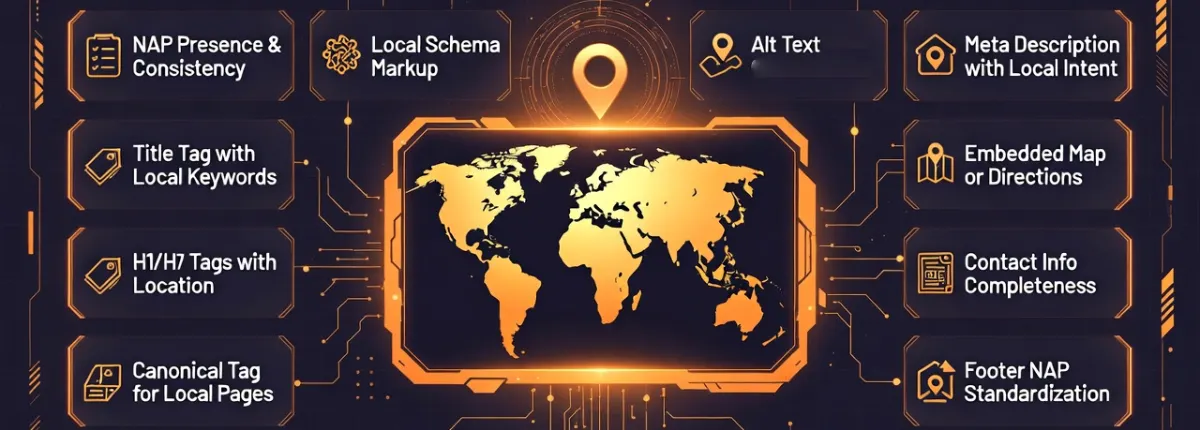
- NAP Presence & Consistency — visible address/phone match, footer standardisation.
- Local Schema Markup — LocalBusiness type, geo coords, opening hours.
- Title & Meta with Local Keywords — geo-terms inclusion, optimal length.
- H1–H6 Headings with Location — relevance, density in content.
- Embedded Maps & Contact Info — iframes, tel links, completeness.
- Images & Internal Links — local alt text, geo-page anchors.
With gauges, deep-dive modules, prioritized fixes ranked by impact, and predictive gain forecasts. Fully mobile‑friendly with dark/light modes. The tool is actionable, with educational insights to elevate local rankings and UX quickly.
Key Insight
Local on-page optimization is crucial for map pack visibility. Master these elements with our free tool to build stronger geo‑relevance and drive local foot traffic.
Local SEO Optimizer
We built Traffic Torch to cut through the noise. No fluff, no dark patterns – just honest, actionable data about your site’s findability and user experience. Use it to fix what’s broken, and let your users (and search engines) do the rest.
Local SEO Checklist 🗝️ ↓
Key Local SEO Practices: What to Do & What to Avoid?
✅ Best Practices to Implement
- Include consistent NAP in footer and contact page.
- Add LocalBusiness schema with geo coords and hours.
- Incorporate location keywords in title, meta, headings.
- Embed Google Maps and use tel/mailto links.
- Optimize image alts with local descriptors.
- Link internally to location-specific pages.
- Maintain natural local keyword density in content.
❌ Common Mistakes to Avoid?
- Inconsistent or missing NAP across pages.
- Absent local schema or invalid markup.
- Generic titles/metas without geo-terms.
- No embedded maps or incomplete contact info.
- Images without local alt text.
- Poor internal linking to geo-pages.
- Keyword stuffing with location terms.
Following these guidelines helps search engines verify your local presence while delivering better user experience for nearby searchers.
📍 NAP & Core Local Optimization
🏷️ Local Schema & Structured Data
🔑 Local Keywords, Headings & Media
🔗 Linking, Reviews & Overall Score
Master this local SEO checklist with our instant audit tool — unlock fixes and boost your map pack performance today.
Why Local On-Page Optimization Matters? ↓
Local On-Page Is Your Map Pack Foundation
Search engines prioritize local pages that demonstrate accurate location signals, authority, and user value through on-page elements.
Excelling in local on-page SEO boosts map visibility, engagement, and sustained foot traffic.
Proven Real-World Benefits
Geo-optimized titles and metas drive better clicks in local results.
Strong NAP/schema signals elevate positions in local packs.
Valid local schema unlocks stars, hours in SERPs.
Maps, complete info reduce friction for nearby users.
The Bottom Line
While external citations vary, you control local on-page excellence. Optimize it for a lasting edge in "near me" searches.
Use our free local SEO checker to audit, refine, and grow your local traffic confidently.
Perfect local on-page → Influence map packs.
Frequently Asked Questions about Local SEO
What is NAP in local SEO and why is it important? ▼
How do I conduct local keyword research for SEO? ▼
What type of local content should I produce to improve SEO relevance? ▼
How do I rank higher on Google Maps? ▼
What is schema markup and how does it benefit SEO? ▼
What is a canonical tag and when should it be used? ▼
5 High-Impact Moves to Rank in Your Local Market
Complete every field, weekly fresh posts, Q&A answered, services/products menu, high-quality photos & video.
Exact same Name, Address, Phone & categories across 50+ major directories — tiny inconsistencies destroy local trust.
Generate fresh 4.8+ star reviews regularly and reply thoughtfully to every review (including negatives) within 24 hours.
FAQ pages, service pages, “near me” content with LocalBusiness + FAQPage schema — wins rich results, voice & AI answers.
Lightning fast, click-to-call, embedded map, clear hours & CTA buttons. Turn searchers into callers/visitors instantly.
Old Local SEO vs Modern Local SEO
| Factor | Old-School Local SEO Focus | Modern Local Mastery Focus |
|---|---|---|
| Primary Goal: | Appear in the 3-pack. | Drive calls, visits, directions + pack + Maps + AI mentions. |
| Core Asset: | Maximum citations. | Perfect GBP + review velocity + fast converting site. |
| Reviews Strategy: | Quantity over everything. | Quality + consistent flow + fast thoughtful replies. |
| Content Approach: | Keyword-stuffed pages. | Intent-first + LocalBusiness/FAQ schema + real photos. |
| Website Role: | Just needs to exist. | Conversion engine (mobile speed, click-to-call, trust signals). |
| Trust Signals: | Directory listings only. | Customer signals (reviews, photos, Q&A) + E-E-A-T. |
| AI / Voice Search: | Completely ignored. | Answer extractability + voice-friendly schema & content. |
Modern local search rewards businesses that are consistent, loved, fast, and instantly trustworthy to both customers and machines.

Traffic Torch
Precision Local SEO On-Page Optimization Audit Tool.
The Local SEO On-Page Audit Tool distills years of correlation research and real-world testing into a fast, accurate diagnostic that reveals hidden optimization gaps in seconds.

Ylia Callan – Lead Developer
Musician • Author • Researcher • Web Designer • TAFE NSW Australia • Creator of privacy-first local SEO web tools. Bridging creativity, consciousness exploration, and modern technology to build meaningful, performant, and user-centric experiences.
Stack Setup
Hosted via GitHub for fast static delivery and updates. Protected and accelerated globally by Cloudflare with edge CDN, security, and performance optimizations.
We built Traffic Torch to empower every business owner - from local shops to agency professionals, with a powerful, free Local SEO on-page audit tool. Get transparent, evidence-based feedback and prioritized fix recommendations that directly strengthen your geo-relevance signals, boost user satisfaction, and elevate local visibility in map packs and organic results.
Published: 2025-01-12
Last updated: 2026-10-02